Getting started
Get Josync
- Either
- Download the latest 1.x release zip file from https://github.com/jeinarsson/josync/releases/
- Or, if you’re familiar with git, checkout the stable_1 branch.
- git clone https://github.com/jeinarsson/josync.git -b stable_1
Josync consists of a few python .py files and a couple of JSON-formatted configuration files. The main file which you will use to run Josync is josync.py.
Prerequisites
- Running Josync 1.x requires, in addition to Josync itself,
- Python 2.7,
- Download and install from https://www.python.org/downloads/
- Cygwin with rsync and cygpath binaries,
Download and install from http://cygwin.com/install.html
Cygwin has its own installer offering many, many packages. For Josync, you need only to check rsync in the category net. The installer will find the dependencies automatically.
You will shortly configure the path to the cygwin binaries in the configuration step below.
- A copy of vshadow.exe for your operating system.
- Either (recommended)
- download the zip with binaries from the 1.0 release at https://github.com/jeinarsson/josync/releases/tag/1.0 and find the version appropriate for your OS. Extract the appropriate file into the Josync folder and rename it vshadow.exe.
- Or
- install the Windows SDK for your Windows version and find vshadow.exe from the Samples section.
If you put vshadow.exe elsewhere, or give it another name, you will need to specify the new path in the configuration file in the next step.
Basic configuration
Josync reads its configuration from a JSON-formatted files.
To get started Josync needs to know where to find the external binaries. By default Josync looks for them in the current working directory. If they are available elsewhere, specify the corresponding paths in default.josync-config.
For example:
{
    "cygwin_bin_path": "C:/cygwin64/bin",
    "vshadow_bin": "d:/projects/josync/ext/vshadow.exe",
}
Note: you may also create a file called user.josync-config containing your settings. Any configuration options specified there will override the options in default.josync-config. We use this to avoid Git replacing our settings.
Running a basic sync job
Josync reads job descriptions from JSON-formatted job-files.
Josync 1.x contains a sample job description in syncjob-example.josync-job, it looks like this:
{
    "type": "sync",
    "sources": [
                {"path": "d:/phd", "excludes": []},
                {"path": "d:/projects", "excludes": ["*.pyc;*.pyo"]}
        ],
    "global_excludes": ["*.hdf5"],
    "target": "g:/Josync Backups/work"
}
Job descriptions consist of a job type, a list of source paths and a target path. Optionally, a job description may contain exclusion patterns. Excludes may be specified either globally or per source.
Modify the job description to make sense on your system, and try running this job:
python josync.py syncjob-example
In addition to the output in the console, Josync writes log files. The file main.josync-log contains a brief entry for each run. In addition each job gets one dedicated log file with more details.
Note: Josync must run with Administrator privileges. This is required to create Shadow copies.
Scheduling
When we schedule Josync to run using the built-in Task Scheduler in Windows, we execute with pythonw.exe instead of python.exe. The only difference is that pythonw.exe does not open a command-line window, but runs quietly in the background. The “Action” of the task can look like this (click for larger version):
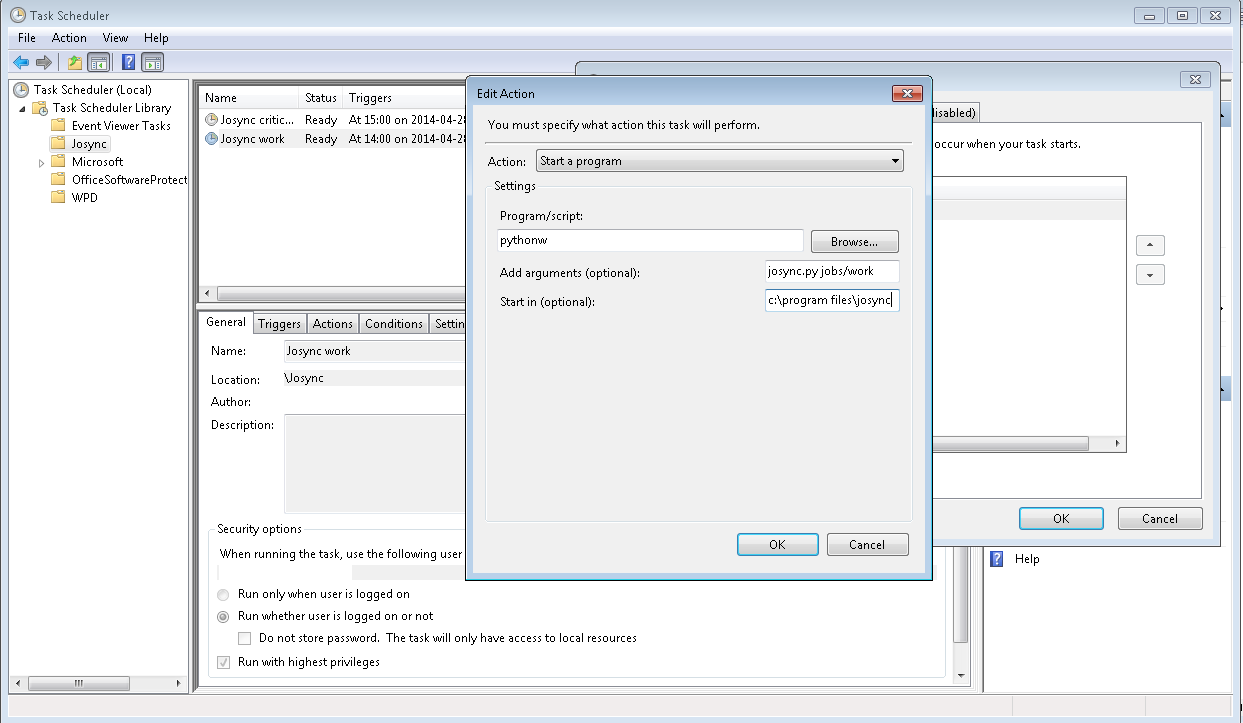
Screenshot of Task Scheduler
- Check carefully that
- The working directory is correctly typed in (it must be the folder where josync.py resides)
- Your job is set to run with Administrator privileges
Next steps
- Now that Josync 1.0 runs you probably want to
- check out Failure notifications,
- know more about and configure the log files written by Josync: Logging,
- read the details about the available job types